Recently I made some changes to the typography of subheadings on this site: I made them all uppercase and for the h2s I used the first-letter pseudo class to give the first letter a larger font-size (150%). I didn't notice at first however that Firefox does something weird to elements with first-letter applied if that element is wrapped around an anchor.
Weird, and annoying, as it causes the height of the line to collapse. For those not using Firefox, what happens is that when you hover over the heading which contains an anchor, the first letter, which before being hovered over has a font-size 150% of the rest of the h2, suddenly shrinks back down to be the same size as the rest of the line and stays that way when you roll off it again and until the page is refreshed. (It should be pointed out that this only happens in Firefox 2; the issue has been resolved in Firefox 3.)
I thought the behaviour might have something to do with Firefox incorrectly interpreting the first letter of the heading as being the anchor rather than the actual text, and substituting the anchor with a span (or any other inline element) seems to back up this theory as the same effect can be witnessed:
I contain a span
But it's not just Firefox 2 that has a hard time with the above combination of block level containing an inline element; IE6 & 7, Opera and Safari all get it wrong too, but in different ways. Let's start with just a h2 with a larger first letter:
First letter applied to a heading
This is what it looks like in the different browsers (IE6 & 7 both display the same in all cases):
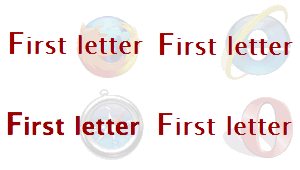
All good so far, everything looks as it should. But what happens if we add an inline element inside the heading – an anchor, span or em?
First letter applied to a heading containing an inline element
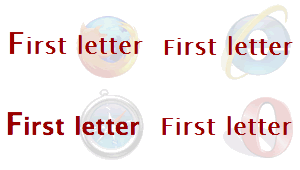
Firefox and Safari still have it right, but both Opera and IE6 & 7 have shrunk the first letter down so that it is actually smaller than the tallest characters of the surrounding text and the top of the letter appears to be clipped. That's not to say that Firefox and Safari have it completely right as you find when you hover over the heading:
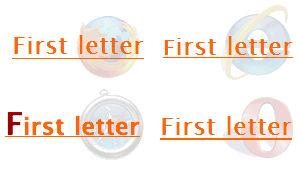
As outlined above, Firefox shrinks the letter, while Safari fails to honour the change in text colour; both IE and Opera render the same as before except for the different colour. Things get stranger still if you float the first letter (which is a usage suggested by the W3C for creating drop caps).
Floated first letter applied to a heading containing an inline element
Doing this fixes the hovering problem in Firefox (almost – the first letter isn't underlined when you hover over the anchor). Safari still displays the same bug relating to not changing the colour on hover. IE shrinks the letter upwards as well as the underline on hover:

...and Opera does different things depending on whether the inline element is an anchor or a span:

With an anchor, the first letter looks the same as it did when it wasn't floated (above), but with a span, it displays differently (below), closer to how Safari displays it.
As mentioned above, Firefox 3 has now fixed the bug. I tested the effect in Opera 9.5 and the latest Webkit nightly (Safari) and the respective bugs are still evident in both of them. IE8 beta actually displays exactly the same for all the examples but in all of them, the first letter seems to be smaller than the tallest letters in the line and slightly clipped (see the second image above). So it appears that Firefox 3 is the only browser to actually get it right, which is just as well because the current behaviour of changing the size on hover is almost the most 'broken' too.


